
 By Ankit Verma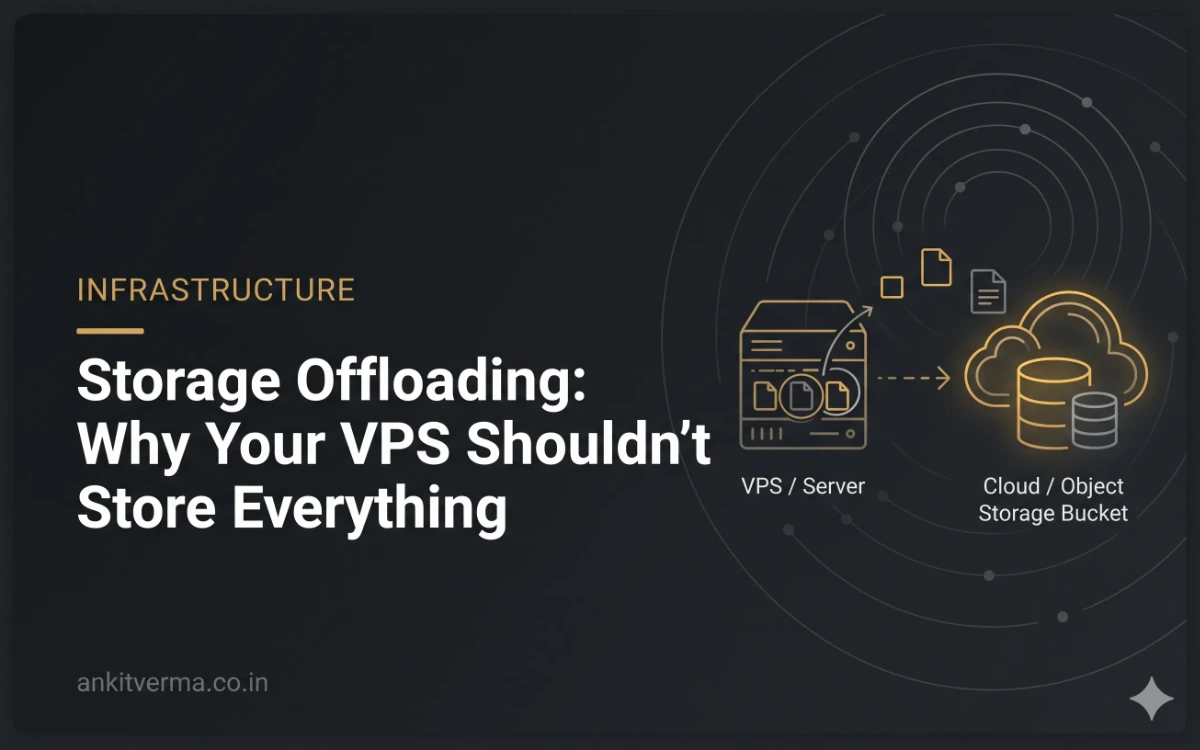
When we build a web application, we usually start with a server, a database, and a place to store uploaded files. If the application is built with Laravel, storing uploaded images in the storage/app/public directory is a perfectly reasonable starting point.
The application works, files are accessible, and everything is running on the same server. For a small project, this setup is often enough.
But what happens when the application grows?
Users start uploading profile pictures, documents, product images, videos, and other media. The number of files increases, backups become larger, and the server's disk space starts getting consumed by more than just the application itself.
At some point, it makes sense to ask a simple question:
Does my application server really need to store all the files uploaded by its users?
This is where storage offloading comes in.
What Is Storage Offloading?
Storage offloading means moving certain storage responsibilities away from your application server to a separate storage service.
Instead of keeping every uploaded file on your VPS, you store those files in an object storage service such as Cloudflare R2 or Amazon S3.
Your application continues to handle user authentication, database operations, business logic, and file uploads. The actual files are stored separately.
For example, imagine a Laravel application where users upload photos.
Without storage offloading, the architecture might look like this:
VPS: Laravel application, database, uploaded photos, documents, and other files.
Database: User information and references to uploaded files.
With storage offloading, the architecture changes:
VPS: Laravel application and database.
Object storage: Uploaded photos, documents, videos, and other media.
Database: User information and references to the stored objects.
The application still knows which file belongs to which user. It simply doesn't need to keep the file itself on the VPS.
This separation can make an application easier to maintain, scale, and back up.
Why Should We Move Files Away From the VPS?
A VPS has limited resources. Even when it has enough CPU and RAM to handle application traffic, its disk space is still a separate constraint.
Let's say you have an 8 GB VPS running a Laravel application. The server also has a database, Nginx, background workers, logs, and other services.
Now imagine that users upload 100 GB of photos and documents over time.
You don't necessarily need a bigger VPS just because your application needs to store more files. You may be able to keep the existing application server and move those files to object storage.
There are several practical reasons to consider this approach.
1. Your VPS Disk Doesn't Fill Up as Quickly
Uploaded files can consume more disk space than the application code itself.
A few thousand images might not seem like much initially, but user-generated content can grow continuously.
By moving these files to object storage, you can reserve your VPS disk for the application, database, logs, temporary processing, and other server-side requirements.
This doesn't eliminate disk-space concerns entirely. Database growth, logs, caches, and temporary uploads still need to be managed.
However, it removes one potentially significant source of growth.
2. Backups Become Easier to Manage
Backing up a complete server is important, but the amount of data you need to protect can grow considerably when all user uploads are stored on the same machine.
Consider a project with a database, application code, configuration files, and 50 GB of uploaded media.
If your backup process copies everything every day, the amount of data involved can become unnecessarily large, depending on how the backups are configured.
Separating application data from uploaded media allows you to manage them independently.
For example:
Back up the database regularly.
Back up application configuration and other important server files.
Use appropriate backup or replication mechanisms for object storage.
Define retention periods and test whether the data can actually be restored.
There is one important distinction here: moving files to object storage does not automatically mean those files are backed up.
Object storage is designed for durable storage, but accidental deletion, compromised credentials, and application bugs can still cause data loss. If the files matter, your backup and recovery strategy must account for them.
3. You Can Scale Storage Separately From Compute
Suppose your application grows from 100 users to 10,000 users.
You may eventually need more computing power, more database capacity, or better caching. But you might also need significantly more file storage.
These are different requirements.
With a traditional setup, you may end up increasing your VPS storage along with other resources, even when the application itself doesn't need additional CPU or RAM.
With object storage, you can manage file storage independently.
Your application can continue running on one server while the number and size of stored objects increase.
Of course, object storage doesn't automatically solve every scaling problem. You still need to consider database performance, network latency, application architecture, and the way files are delivered to users.
But it gives you more flexibility when planning infrastructure.
What Is Object Storage, Exactly?
Object storage is a way of storing data as individual objects rather than managing everything through a traditional filesystem.
Each object generally consists of:
The actual data, such as an image or PDF.
A unique key used to identify the object.
Metadata describing the object.
Objects are organized into buckets, which provide a way to group and manage stored data.
For example, a bucket might contain objects with keys such as:
users/125/profile.webpproducts/842/main-image.jpgdocuments/2026/invoice-1042.pdf
These paths look like directory structures, but object storage generally treats them as object keys rather than ordinary filesystem directories.
Your application can use these keys to identify files and retrieve them when needed.
This is different from a traditional VPS filesystem, where files are stored on a disk attached to the server and accessed through the operating system.
Object storage is particularly useful for data such as images, videos, documents, backups, and other files that don't need to be stored as database records.
Cloudflare R2 vs Amazon S3: What Is the Difference?
Two services worth understanding are Cloudflare R2 and Amazon S3.
Both provide object storage, but their pricing models, integrations, and surrounding infrastructure differ.
Cloudflare R2
Cloudflare R2 is an object storage service that supports the S3 API. This means you can use many existing S3-compatible SDKs and tools to interact with R2.
One of its most attractive features is that it doesn't charge for internet egress bandwidth.
In simple terms, you can store files in R2 and serve them to users without paying R2 egress fees for transferring those files out of the service.
This is particularly interesting for applications where users frequently view or download uploaded content.
Imagine a travel application where users upload hundreds of photos from their trips and share them with other members of a group.
If those photos are accessed frequently, bandwidth costs can become an important part of the storage decision.
R2 is worth considering for this type of application.
Other useful features include:
S3-compatible API access.
Object storage without R2 egress charges.
Integration with Cloudflare's broader ecosystem.
Support for public and private storage patterns.
Monthly free allowances for eligible standard storage usage and operations.
However, free allowances are not unlimited storage. You still need to account for stored data, API operations, and the particular features you use.
Also, if you use other paid services to process or deliver data, those services may have their own charges.
Amazon S3
Amazon S3 is AWS's object storage service and is one of the established options for storing application files and other unstructured data.
S3 offers several capabilities, including:
Multiple storage classes for different access patterns.
Lifecycle rules to transition or expire objects.
Versioning to retain previous versions of objects.
Access management through AWS Identity and Access Management (IAM).
Integration with other AWS services.
Options for replication and other data-protection strategies.
One particularly useful feature is its range of storage classes.
For example, files that users access frequently may belong in S3 Standard, while suitable files that are rarely accessed might be candidates for a lower-cost storage class.
Archive storage can be useful for data that doesn't need to be retrieved immediately.
The important thing is to choose based on how the application actually uses the data. A cheaper storage class isn't necessarily cheaper overall if retrieval charges, access delays, or other requirements make it unsuitable.
S3 is especially worth considering when an application already relies on AWS or needs the broader set of services and controls available in that ecosystem.
What About Other Storage Providers?
Cloudflare R2 and Amazon S3 are not the only options.
Depending on the application, budget, and technical requirements, you can also evaluate services such as:
Backblaze B2: An object storage service worth evaluating for file storage and backup workloads.
DigitalOcean Spaces: An object storage service that may be convenient for applications already hosted on DigitalOcean.
Wasabi: An object storage provider worth evaluating for storage-focused workloads, subject to its pricing and usage policies.
The right choice depends on more than the advertised storage price.
You should also compare data-transfer charges, API request costs, retrieval fees, minimum storage periods, compatibility, access controls, and the practical process of migrating your files.
For a small application, a simple and predictable pricing model may be more valuable than a long list of advanced features.
Understanding Egress: Why File Downloads Can Affect Your Bill
One term worth understanding when comparing storage providers is egress.
Egress generally refers to data transferred out of a service.
Suppose your application stores 100 GB of images and users collectively download or view 1 TB of those images in a month.
The amount of data stored is 100 GB, but the amount transferred out is much higher.
Depending on the provider and the way the files are delivered, storage and data-transfer costs can be separate.
This is why comparing providers only by their price per GB of storage can be misleading.
For an application that stores documents and rarely serves them, transfer costs may be relatively unimportant.
For an application that serves thousands of images or videos every day, they may be a major consideration.
Cloudflare R2 is interesting here because it doesn't charge egress fees for data transferred directly out of R2. Its storage and operation charges still apply, subject to the relevant pricing terms.
Amazon S3 has its own pricing structure, including storage, requests, data transfer, and other applicable charges.
Before choosing a provider, estimate both how much data you will store and how frequently users will access it.
How Does Storage Offloading Work in a Laravel Application?
Let's take Laravel as an example because it already provides a filesystem abstraction.
This is one of the useful things about Laravel: your application doesn't have to be tightly coupled to a particular storage provider.
You can configure a filesystem disk and use Laravel's filesystem APIs to store and retrieve files.
For example, a simple upload might look like this:
$path = $request->file('image')->store(
    'uploads',
    'public'
);
Here, public is the name of a configured Laravel filesystem disk. In a typical Laravel setup, this may point to local storage.
If you later configure an S3-compatible disk for Cloudflare R2, you can use that disk instead:
$path = $request->file('image')->store(
    'uploads',
    'r2'
);
The r2 disk must be configured in your Laravel filesystem configuration, including the appropriate endpoint, bucket, region, and credentials.
The example assumes you have already configured the required disk and installed the necessary S3-compatible filesystem dependencies.
The important part is that the application can use Laravel's filesystem abstraction rather than implementing a completely different file-storage mechanism for every provider.
This makes it easier to change storage configurations later.
For example, your application could use local storage during development and Cloudflare R2 in production.
The exact configuration will depend on the Laravel version, installed filesystem adapter, and storage provider.
What Should You Store in the Database?
There is another important architectural decision here.
When a user uploads an image, you generally don't need to store the entire image inside your MySQL database.
Instead, you can store information such as:
The user who uploaded the image.
The storage disk.
The object's key or path.
The original filename, if required.
The MIME type and file size.
Upload timestamps and other application metadata.
For example, a database record might contain:
id: 125
user_id: 42
disk: r2
path: uploads/user-42/profile.webp
mime_type: image/webp
size: 184320
The file itself lives in object storage, while the database keeps track of it.
Keeping the disk and object key separate is particularly useful. If you migrate files from one provider to another, you can update the relevant references without redesigning the entire application.
For production applications, I would also avoid relying on a user's original filename as the unique object key. Generate controlled, unique paths and validate uploads properly.
Should the Files Be Public or Private?
Not every uploaded file should be accessible to everyone.
A product image on a public website may be intended for public access. A user's identity document, invoice, or private attachment should not automatically be accessible through a public URL.
For private files, you can use authenticated application downloads or temporary, signed URLs where appropriate.
Access permissions should be designed deliberately. Hiding an object's URL is not a replacement for access control.
This is particularly important when working with documents, customer information, and multi-tenant applications.
A Practical Example: A Travel Application
Consider a travel application where people can create trips, invite other members, and upload photos.
The database might contain:
Users.
Trips.
Trip members.
Itineraries.
Expenses.
Photo metadata.
The photos themselves can live in object storage.
When someone uploads a photo, the application validates the file and stores it in R2 or another configured storage service. It then records the object's key and related information in the database.
When another member opens the trip, the application retrieves the appropriate file reference and displays the image.
The database doesn't need to contain the image binary, and the VPS doesn't need to keep every uploaded photo on its local disk.
This separation also creates room for future improvements.
For example, you could generate smaller thumbnails, compress images, and process uploads through a background queue.
You could also use different storage rules for temporary uploads, original photos, and processed images.
The result is a more flexible design without making the application unnecessarily complicated from day one.
Does Offloading Mean Files Should Always Go Directly to Cloud Storage?
Not necessarily.
There are different ways to handle uploads.
In one approach, the file is uploaded to your application server first. Laravel validates it and then transfers it to object storage.
This is straightforward, but the file temporarily consumes server resources and network bandwidth.
For larger files or applications with significant upload traffic, you can consider direct-to-object-storage uploads.
In that setup, your backend authorizes an upload and generates a temporary signed URL. The client then uploads the file directly to the storage provider.
The backend can subsequently verify the upload and save the relevant metadata.
This can reduce the amount of file-transfer work handled by your application server.
However, direct uploads require careful implementation. You need to validate the intended object key, enforce file-size and content restrictions, manage URL expiry, and verify that the expected upload actually completed.
The choice depends on the application's size, upload patterns, and security requirements.
For a small application, starting with Laravel's normal upload flow and a properly configured object-storage disk may be perfectly reasonable.
What About Images and Videos? Should We Compress Them?
Moving files to object storage doesn't automatically reduce their size.
If a user uploads a 12 MB image, it can still occupy approximately that amount of storage after offloading unless you process or convert it.
For image-heavy applications, you can consider:
Converting supported images to efficient formats such as WebP or AVIF.
Generating thumbnails for previews.
Resizing images when full-resolution originals aren't needed.
Applying sensible upload-size limits.
Processing larger files in background jobs.
Videos require a different approach because compression and transcoding can be computationally expensive.
If your application needs multiple video resolutions or streaming formats, you should plan for a dedicated processing workflow.
The general principle is simple: store the original when you need it, generate optimized versions for delivery when appropriate, and avoid serving unnecessarily large files to every user.
These optimizations can reduce storage consumption, network usage, and loading time.
Can Object Storage Replace My VPS?
No. Object storage solves a different problem.
Your VPS can continue running Laravel, handling requests, executing background jobs, and connecting to the database.
Object storage provides a separate place for the files your application needs to keep.
You still need to manage:
Application deployments.
Database backups.
Server security and updates.
Logs and monitoring.
Queue workers and scheduled tasks.
Storage permissions and access credentials.
File retention and recovery.
You also need to think about what happens if the storage provider becomes temporarily unavailable or an upload fails.
For example, your application shouldn't assume that a file was successfully stored simply because a user submitted an upload form. The application should handle failures and only mark the upload as complete when it has verified the required operation.
Separating storage is useful, but it doesn't remove the need for good application and server management.
Is Object Storage a Backup Solution?
This is worth discussing separately because storage and backup are often treated as if they mean the same thing.
They don't.
Object storage is a place to store data. A backup is a recoverable copy maintained to protect against data loss.
Suppose your application stores all uploaded images in an R2 bucket. If a bug accidentally deletes those images, moving them to R2 doesn't automatically bring them back.
Depending on the service and configuration, features such as versioning, replication, or retention policies may help protect against certain failures.
However, these features have different purposes and limitations. Replication may copy an accidental deletion, and versioning may require additional policies to prevent old versions from accumulating indefinitely.
For important data, you should decide how many copies you need, where they should live, how long they should be retained, and how you will restore them.
You should also test the recovery process instead of assuming it will work when needed.
For my own server-management workflows, this distinction matters: backing up the application server and protecting the files stored in a separate object-storage service are two related but separate responsibilities.
Which Storage Service Would I Choose?
There isn't one answer that fits every project.
My decision would depend on the application's requirements, expected traffic, budget, and existing infrastructure.
Requirement | What I would evaluate |
|---|---|
A small Laravel application with user uploads | Cloudflare R2 or another S3-compatible service |
Frequent public image and file delivery | Storage pricing, egress charges, caching, and access patterns |
An application already built around AWS | Amazon S3 and its integration with the existing AWS infrastructure |
Long-term storage of rarely accessed data | Storage classes, retrieval fees, and minimum storage periods |
VPS and database backups | Backup tools, retention, encryption, restore testing, and storage-provider costs |
Private customer documents | Access control, signed URLs, security requirements, and retention policies |
For a Laravel application where I want to keep the VPS lightweight and store user-generated media separately, Cloudflare R2 would be one of the first options I would evaluate.
Its S3-compatible API makes it possible to integrate with familiar tools, and its no-egress-fee pricing model is attractive for applications that serve a lot of files.
That doesn't mean R2 is automatically the cheapest or best choice for every workload. The actual costs and technical requirements still need to be checked.
Amazon S3 remains a strong option, particularly when the application needs its broader storage features or is already part of an AWS-based architecture.
The point is not to choose a provider simply because it is popular. It is to understand the problem first and then choose the service that fits.
Final Thoughts
When we build an application, it is easy to focus on the code, database, and server configuration while treating file storage as a minor detail.
That works initially, but storage decisions can have a real impact as the application grows.
Uploaded files consume disk space, affect backups, and create additional responsibilities for server management. Keeping every file on the application server isn't always necessary.
Separating the application from its file storage gives you more flexibility. You can scale storage independently, choose a provider based on your requirements, and manage files without making your VPS responsible for everything.
For me, the bigger lesson is about designing applications with their future requirements in mind.
You don't need a complicated cloud architecture for every project. Sometimes, a well-configured VPS, a database, and an object-storage service are enough.
The goal isn't to use more cloud services. It's to put each responsibility in the right place.